In my previous post, I have shown you how to upgrade BlackBerry Curve 3G 9300 to OS 6.
If you feel unhappy with the release, definitely you can downgrade it. The requirements should be the same as in the upgrade guide, but you will need the device software version officially released by your carrier as the downgrade target. You can get the software from Software Download Sites for BlackBerry.
This guide will guide you how to downgrade BlackBerry OS. It has been tested in the BlackBerry Curve 3G 9300 when I downgraded from OS 6.0.0.418 to OS 5.0.0.794 without any problems.
Here are the steps:
1. Make sure that you already have the device software as the downgrade target. If not you can download the software from BlackBerry Software Download page as above.
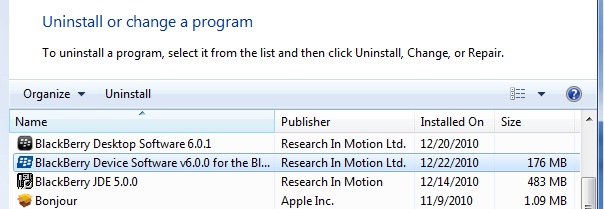
2. Uninstall the current installed software version from the Laptop/PC using Control Panel > Programs > Uninstall a program.
3. Install the targeted device software. Then run the BlackBerry Desktop Software.
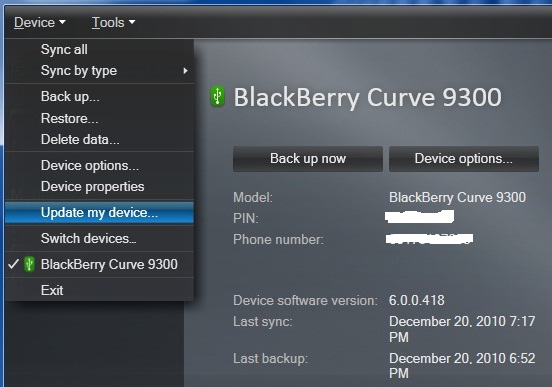
4. In the BlackBerry Desktop Software, go to Device > Update my device…
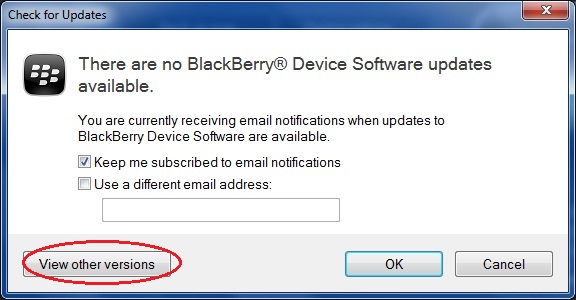
5. ‘Check for Update’ window will appear, click the ‘View other versions’ button.
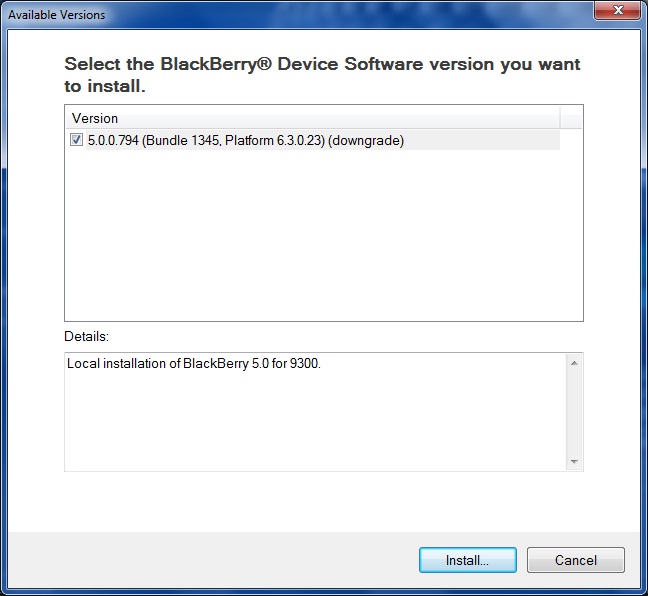
6. There should be available softwares shown in the next step, select the software you want to install then click ‘Install’ button.
The next steps would be the same as in the upgrade guide.