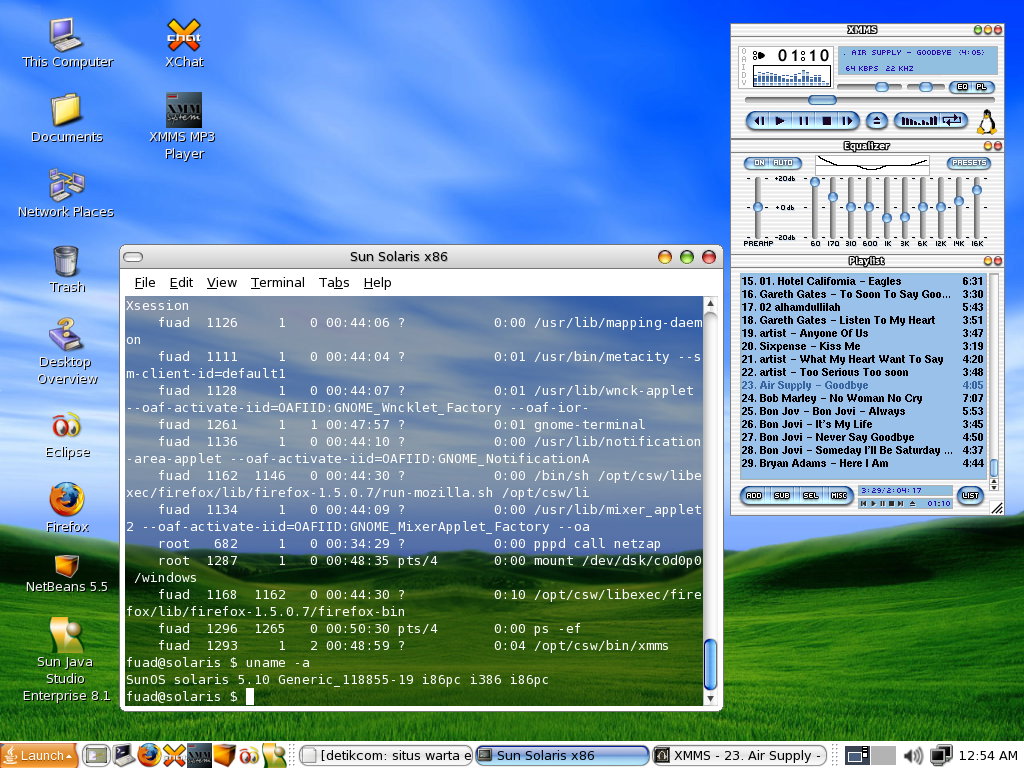
 This is my own Solaris 10 Desktop running on Intel-based PC with Mac OSX like theme. Solaris developers in Sun Microsystem have been trying to make Solaris operating system a competitor of linux and claimed as the most advanced operating system on the planet.
Looking at the features, found a new feature named Solaris Dynamic Tracing (DTrace) that make developers able to observ into the system which enable real-time application debugging and optimization.
For Desktop use, Solaris 10 also gives us a user friendly window desktop application similar with Windows operating system. By selecting Java Desktop System v.3 that running under gnome-session, the desktop is like familiar windows desktop.
In my own opinion, Sun had been doing many improvements to the Solaris 10 to make it more user friendly and even a choice beside Linux and Windows operating system.
Good job for the developers.
————————
Hardwares Specification:
Motherboard ASUS P4GE-MX
Intel Pentium 4 2.26 GHz
512 MB DDRAM
Builtin VGA ( 3D not supported :) )