
In my previous article, I hav shown you how to install Mikrotik on Vitualbox. Now I will show you how to make it accessible from HostOS via Winbox.
Winbox is a GUI application to manage and configure Mikrotik. It will be much easier to manage Mikrotik using Winbox than CLI.
There are two ways to access Mikrotik using Winbox installed in Virtualbox:
1. Assigning ether1 IP Address to the same network of VirtualBox Host-Only Network.
This is the easiest way. You have to attach the Network Adapter of Mikrotik to ‘Host-only Adapter’ belong to ‘VirtualBox Host-Only Ethernet Adapter’. See image below:
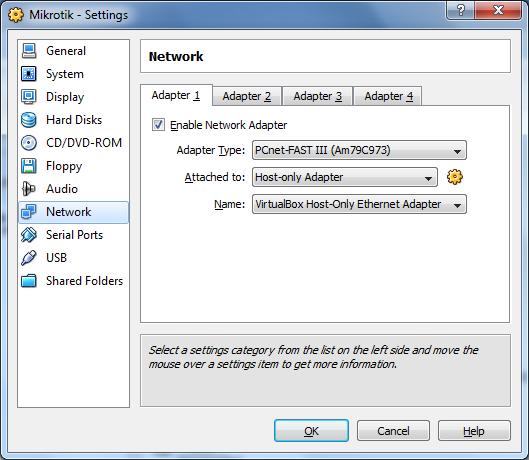
Later you have to set the IP address of ether1 of Mikrotik to be the same network of VirtualBox Host-Only Network. The default IP address assigned to this Ethernet is 192.168.56.1/24, of cource you can change this IP address as you want. You can check the IP Address by using ‘ipconfig’ (Windows) or ‘ifconfig’ (Unix/Linux). See image below:

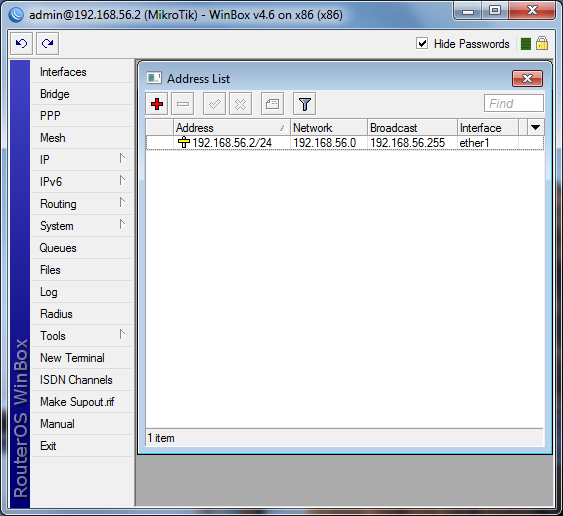
Now run the Mikrotik OS running in Virtualbox. Login using ‘admin’ and empty password. Set the IP address of ether1 to 192.168.56.2/24 or whatever IP address still in the same network.
ip address add address=192.168.56.2/24 interface=ether1
After setting to ethet1 ip address, try to ping the IP address from Host OS (Windows).
C:\Users\Fuad NAHDI>ping 192.168.56.2

Pinging 192.168.56.2 with 32 bytes of data:
Reply from 192.168.56.2: bytes=32 time
If Mikrotik replied the ping, it is ready to access it using Winbox. Run Winbox now and set to Connect To: 192.168.56.2. See image below:
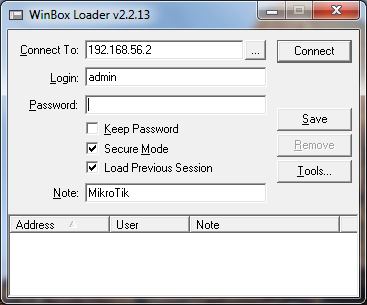
Click ‘Connect’ button and if there are no errors you should successfully log in to the Mikrotik using Winbox.
2. Mapping / Forwarding port used by Winbox.
Using this way you have to map/forward port used by a GuestOS installed on Virtualbox. Winbox is using port 8291 to LISTEN on the system.
So we will map/forward this port from HostOS to the GuestOS.
The command are as below:
C:\Users\Fuad NAHDI>cd\
C:\>cd "Program Files\Sun\xVM VirtualBox"
C:\Program Files\Sun\xVM VirtualBox>VBoxManage setextradata Mikrotik "VBoxInternal/Devices/pcnet/0/LUN#0/Config/winbox/HostPort" 8291
VirtualBox Command Line Management Interface Version 3.0.2
(C) 2005-2009 Sun Microsystems, Inc.
All rights reserved.

C:\Program Files\Sun\xVM VirtualBox>VBoxManage setextradata Mikrotik "VBoxInternal/Devices/pcnet/0/LUN#0/Config/winbox/GuestPort" 8291
VirtualBox Command Line Management Interface Version 3.0.2
(C) 2005-2009 Sun Microsystems, Inc.
All rights reserved.

C:\Program Files\Sun\xVM VirtualBox>VBoxManage setextradata Mikrotik "VBoxInternal/Devices/pcnet/0/LUN#0/Config/winbox/Protocol" TCP
VirtualBox Command Line Management Interface Version 3.0.2
(C) 2005-2009 Sun Microsystems, Inc.
All rights reserved.
After executing the above commands withour any errors, now open Winbox application.
Set the Connect To value to localhost and Login to admin, then click Connect button.
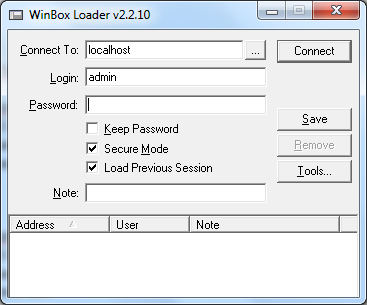
After clicking Connect button and no error during login process, you should successfully log in to the winbox application.
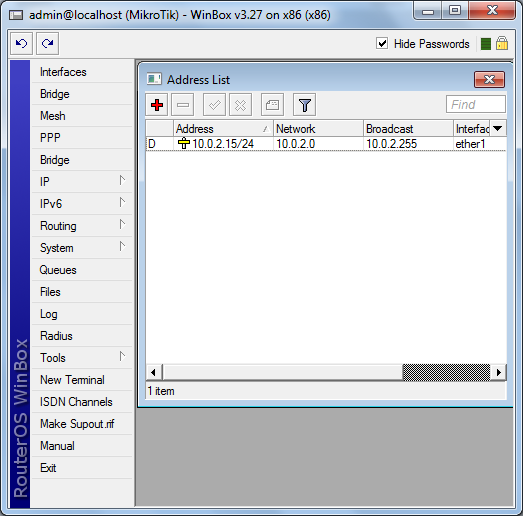
Hope this tutorial useful for others.

I did all u ask in case 1, i can ping the router os but connecting with winbox fails
nice tutorial, got me up and running in less than 2 minutes :)
nice tutoria, got me up and running in less than 2 minutes :)
Thnaks. Method 1 worked for me.
awesome…
kalo di bridge terus di samain ip computer sama virtualbox nya bisa gak?
Hi Iqbal,
Maksudnya IP-nya disamain gimana? Apa tujuannya supaya guestOS di virtualbox bisa diakses dari luar?
oh hey. this turorial helps alot. thanks
but how to install other OS on VirtualBox and connect it to the web trough the mikrotik? of course this mikrotik also on VirtualBox??
thanks alot.
If you have Linux and want to use the nice GUI Tool for the RouterOS. The winbox Tool working perfect with wine.
Yes correct. Not only in Linux, if you have BSD (I tried using PC-BSD) winbox is working perfect with wine.
Thanks for your feedback.
Hi Terry,
Thanks for your comment.
To be frank I never use MS VirtualPC before. But there should be such a way to do that. Let me try it first. In between you can try using Virtualbox. It is simple and straightforward.
Nice tutorial and so useful to me, i never try using virtual box,but i'll try it.
I am from Indonesia…
I had try microsoft virtual pc 2007 to install mikrotik router os,and have a little problems that i couldn't see my ethernets virtualization,and so i can't connect my virtual mikrotik that running on mic.Virtual pc with my host os.
I guess that i must install vmaddition in my virtual mikrotik, but i don't know ho to do that.
Based on your experienced installed vmtool with command line in host os, i believe you can help me to solving my problem which i want to connect virtual mikrotik with "winbox" . Thanks to response