
Mozilla Firefox is second most used browser around the world after Microsoft Internet Explorer (IE). Many people have switched from IE because Firefox is more secure, robust, and many add-ons (third party software that can be installed in the Firefox browser)
This tutorial will show you how to install an add-on in Mozilla Firefox. For example we want to install HootBar (formerly known as TwitterBar). HootBar is an add-on that allows you to post messages to Twitter and other social networks from the Firefox address bar.
OK let’s go to the steps:
1. Go to Firefox’s Add-ons
2. In the Search all add-ons bar, type HootBar. Firefox will search for the best match of the search keyword you entered in the search bar.
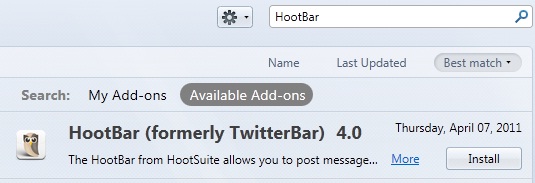
3. Click Install button to start installing the add-on.
4. Restart the Firefox to complete the add-on installation.
5. Done. Installing add-on in Firefox is that easy.