
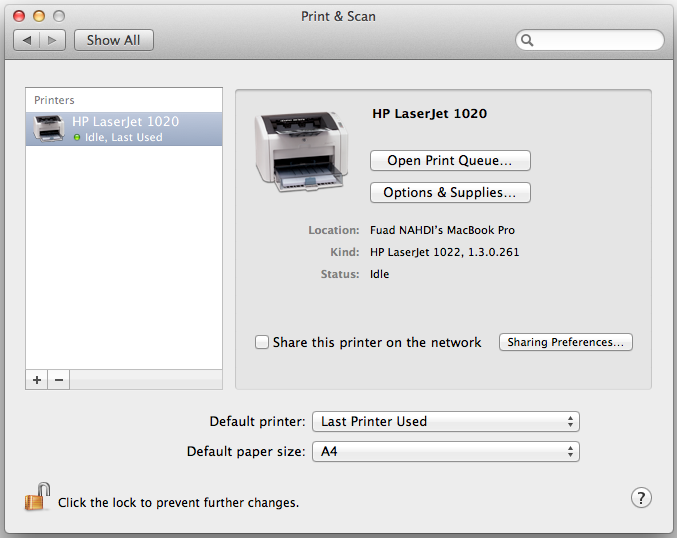
My office has one set of HP LaserJet 1020 mainly for printing any documents. You know, I use MacBook Pro running Mac OS X 10.7.2 Lion for my daily activities. Therefore my MacBook Pro must be able to print documents via the HP LaserJet 1020 printer model.
Fortunately, I don’t need to manually download the driver and install it. It is already there. Though there is no exact driver for this printer model, but I can use the HP LaserJet 1022 driver instead. Yeah, this driver works properly for the HP LaserJet 1020 model.
This tutorial shows you how to install HP LaserJet 1020 on Mac OS X 10.7.2 Lion. The printer is directly connected to the MacBook Pro via USB cable. Here is the step-by-step:
1. Plug the USB cable of the printer in to the USB port
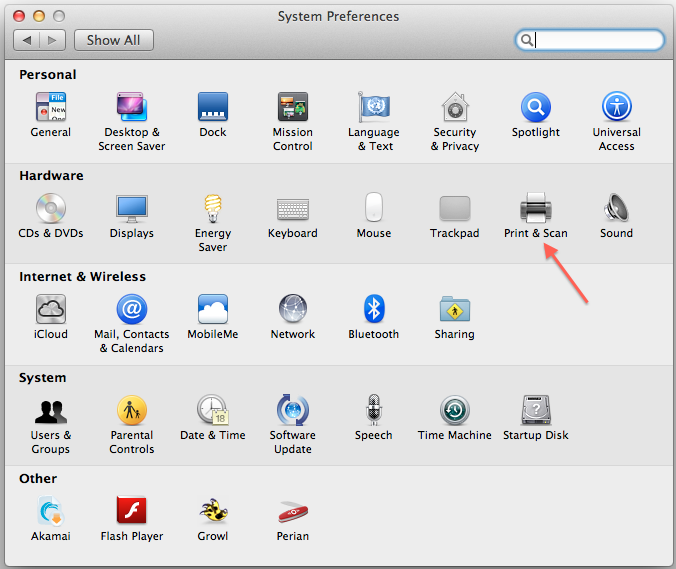
2. Run System Preferences and then click the Print & Scan
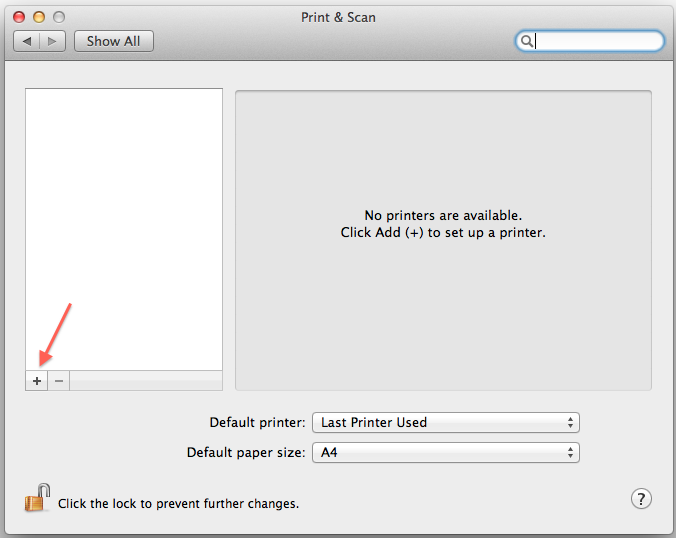
3. In the Print & Scan window, click Add (+) to set up a printer
4. The Add Printer window will appear.
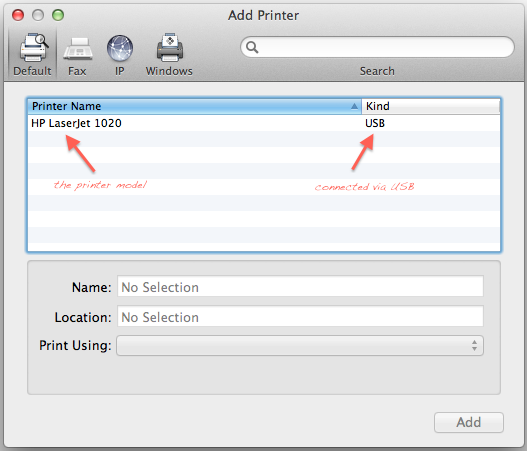
5. Click on the printer model above. The name and location of the printer will be automatically defined. See the image below!
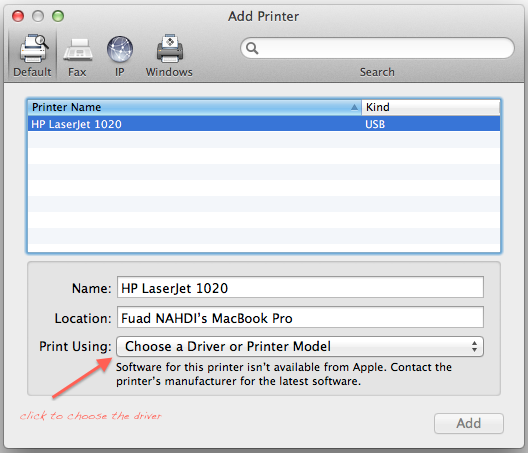
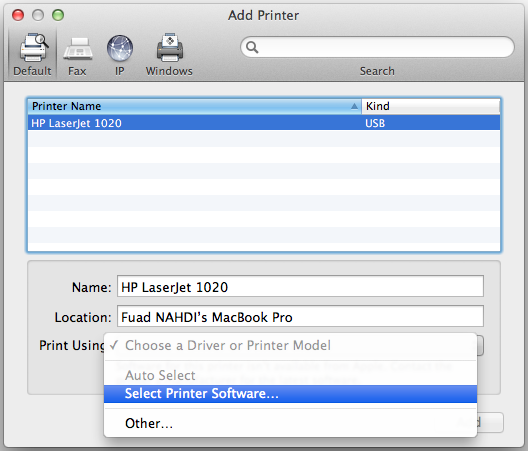
6. Click on the Choose a Driver or Printer Model and then Select Printer Software…
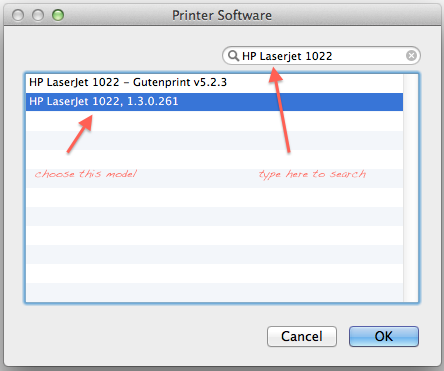
7. The Printer Software window will appear which lists all the installed drivers. Type ‘HP LaserJet 1022‘ in the search bar to quickly find the printer’s driver. Select the ‘HP LaserJet 1022, 1.3.0.261’ and then click OK.
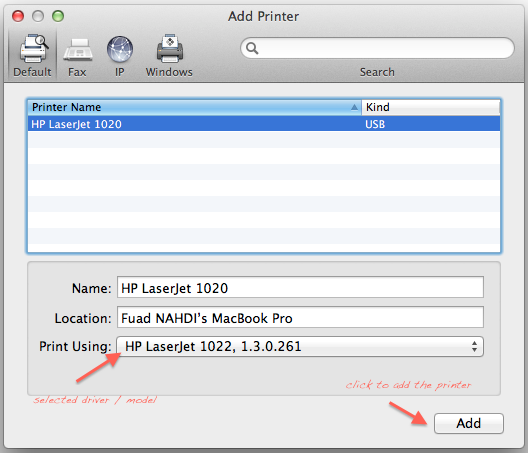
8. Now in the Print Using option as in step 5 should be set to ‘HP LaserJet 1022, 1.3.0.261’. Click the Add button to add the printer.
9. Everything has been done. Now the printer should be listed in the Printer & Scan window.
I hope this tutorial is helpful for you when adding HP LaserJet 1020 on Mac OS X 10.7 Lion.


Thank you very much – it works :-)
OMG, thank you, Thank You, THANK YOU!!! Have been looking for a solution for over 2-years. Apple Tech support has proven to be worthless.
Hi
Thanks for that. Succeeded in installing for an HP Laserjet 1018 on MacOs Lion. Works fine.
hi, pls help me in sorting out this problem..i can’t find the hp laser jet 1022 in the printer software list…how can i get it on the printer software list…
Hi, you may need to install the latest HP printing and scanning software for OS X Lion and Mac OS X v10.6 Snow Leopard. You can download the software at http://support.apple.com/kb/DL907
Tranks a lot!
Thank you very very much. It is necessary to indicate to charge before the drive from: http://support.apple.com/kb/DL907?viewlocale=it_IT.
Best regards
SV
Sergio,
Thanks for leaving comment here and the download link driver.
The 1020 model is still not on the supported list. However, the driver updates for 1022 model from version 1.3.0.261 to 1.3.1.261. Using the initial driver from Lion is still working without any problem :)
Thank you soooo much. Finally I can print!
You’re welcome bro. Glad to hear that it is useful for you. Thank you for visiting and dropping comment.